FloorCapture works on iOS devices with LiDAR.
iOS devices
Not sure which iOS device you have? Find the model number of your device. You can also use these links to identify your iPhone model or identify your iPad model. A newer device will improve scanning.
iPhone
- Newer iPhone versions with LiDAR support
- iPhone 16 Pro Max
- iPhone 16 Pro
- iPhone 15 Pro Max
- iPhone 15 Pro
- iPhone 14 Pro Max
- iPhone 14 Pro
- iPhone 13 Pro Max
- iPhone 13 Pro
- iPhone 12 Pro Max
- iPhone 12 Pro
iPad
- Newer iPad versions with LiDAR support
- iPad Pro 2022
- iPad Pro 2020 (iPad Pro 12.9 inch 4th gen, iPad Pro 11 inch 2nd gen)
- iPad Pro 2021
How can I tell if my device has LiDAR?
Look at the back of your iPhone or iPad near the camera lenses. If you see a small black dot about the same size as the flash, your device has LiDAR.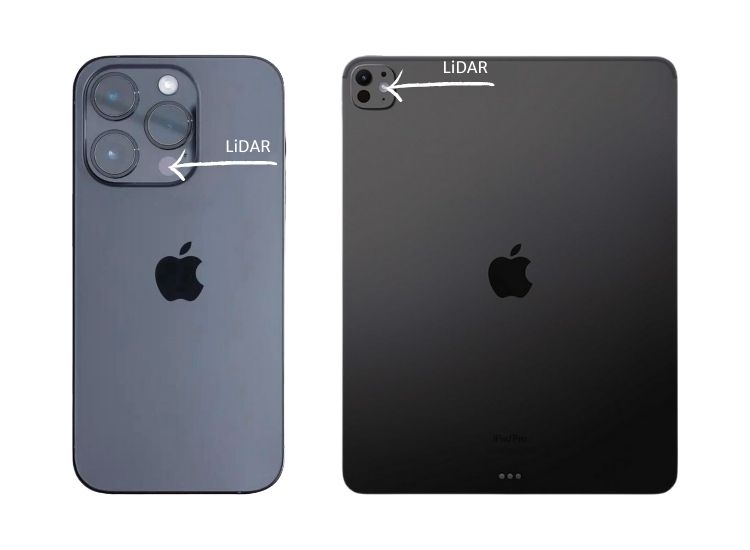
Android devices
For this version of FloorCapture, we are using Apple's RoomPlan SDK to detect walls, windows, doors, and other objects. Supporting Android devices is something we are considering.
See also
Was this article helpful?
That’s Great!
Thank you for your feedback
Sorry! We couldn't be helpful
Thank you for your feedback
Feedback sent
We appreciate your effort and will try to fix the article